
 Plugin
PluginUpdated
Gravity Perks Auto List Field
Gravity Perks Auto List Field is a WordPress plugin by Gravity Wiz that works with Gravity Forms.
Product facts
- Version
- 1.0.7
- Released
- 13 November 2025
- Type
- Plugin
- Licence
- GPL
- Included in
- Every plan, or $4.89 on its own
Overview
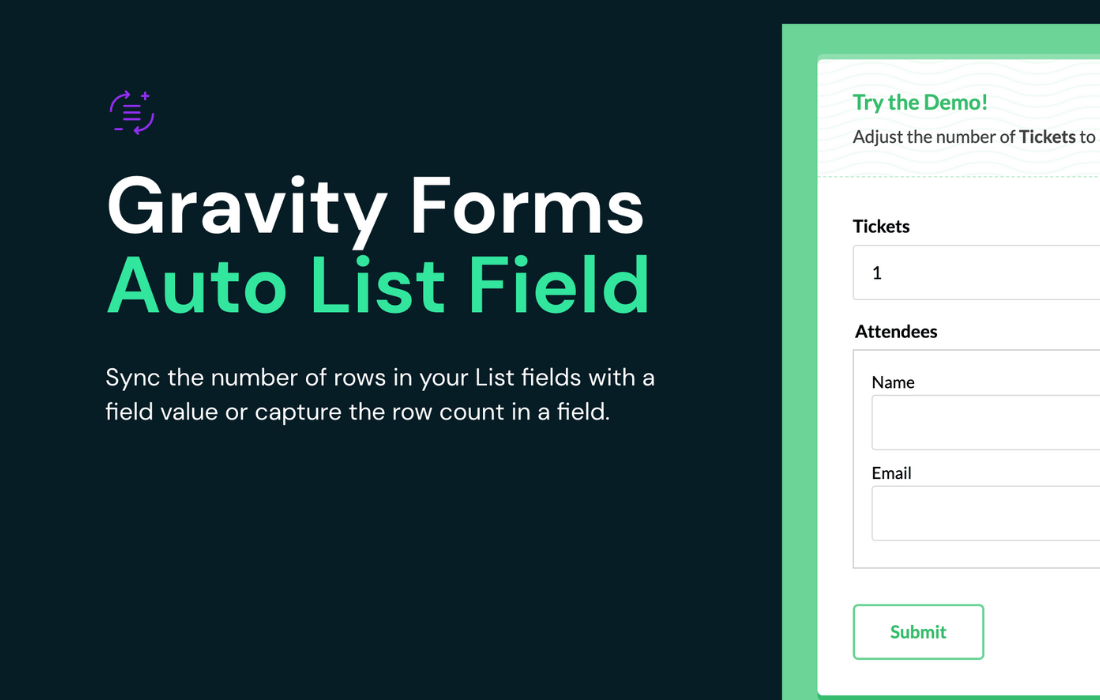
Forms that ask for a number of items often leave visitors to adjust a List field by hand. Someone enters 4 in a Quantity field, then has to click to add four rows themselves. Gravity Perks Auto List Field handles that step. It links the row count of a List field to a Number, Quantity, Single Product or Calculated Product field, so the rows appear or disappear as the value changes.
The link also runs the other way. The plugin can count the rows in a List field and output that number into another field, which is useful for calculations and conditional logic. It supports multi-column List fields and merge tags such as {Label:ID:count}. Developers can adjust its behavior with filters and hooks, including which trigger fields are supported and whether list action buttons are visible.
Features
- Sync rows to a field value: The number of rows in a List field follows the value of a Number or Quantity field, so the list length always matches the visitor's input.
- Works with product fields: Single Product and Calculated Product fields can also control the row count, which suits order forms where each item needs its own details.
- Automatic row adding and removing: Rows are added or removed for you when the trigger field changes, which removes manual edits and cuts down on input mistakes.
- Row count output: The plugin counts the rows in a List field and passes that number into another field, ready for calculations and conditional logic.
- Instant keyup updates: A keyup listener on trigger inputs updates the list as the visitor types, without waiting for them to leave the field.
- Multi-column list support: It works with multi-column List fields and supports merge tags such as {Label:ID:count} for using the row count elsewhere in a form.
- Filters and hooks for developers: Developers can change supported trigger fields, the visibility of list action buttons and frontend script options to fit a particular form.
- Part of Gravity Perks: Auto List Field belongs to the Gravity Perks collection of Gravity Forms add-ons, so it sits alongside other perks for form customization.
Best for
- Gravity Forms users building order or quantity forms
- Developers who want list rows controlled by other fields
- Site owners cutting manual entry errors in forms
Changelog
Version 1.0.7 — 12 November 2025
- Fixed Fixed an issue with count value computing incorrectly in certain payment gateway scenarios.
Earlier versions
- 1.0.6 (16 July 2025): 1 fixed
- 1.0.5 (7 May 2025): 1 new
- 1.0.4: 1 improved
FAQ
Is Gravity Perks Auto List Field free?
The code of Gravity Perks Auto List Field is licensed under the GPL, so anyone may use, change and share it. Buy GPL is a paid service: a plan or a purchase of Gravity Perks Auto List Field gives you the download and its updates. The developer's own support, licence key and online services are not included.
Which version of Gravity Perks Auto List Field is this?
Version 1.0.7, released 13 November 2025. New versions appear here when the developer publishes them.
How do I update Gravity Perks Auto List Field?
Install Buy GPL Updater on your site and paste your key from My Account. It installs new versions of Gravity Perks Auto List Field for you.
More from Gravity Wiz
Plugin Plugin
 Plugin
 Plugin
 Plugin
 Plugin
 Plugin
 Plugin