
 Plugin
PluginUpdated
WooCommerce Product Table
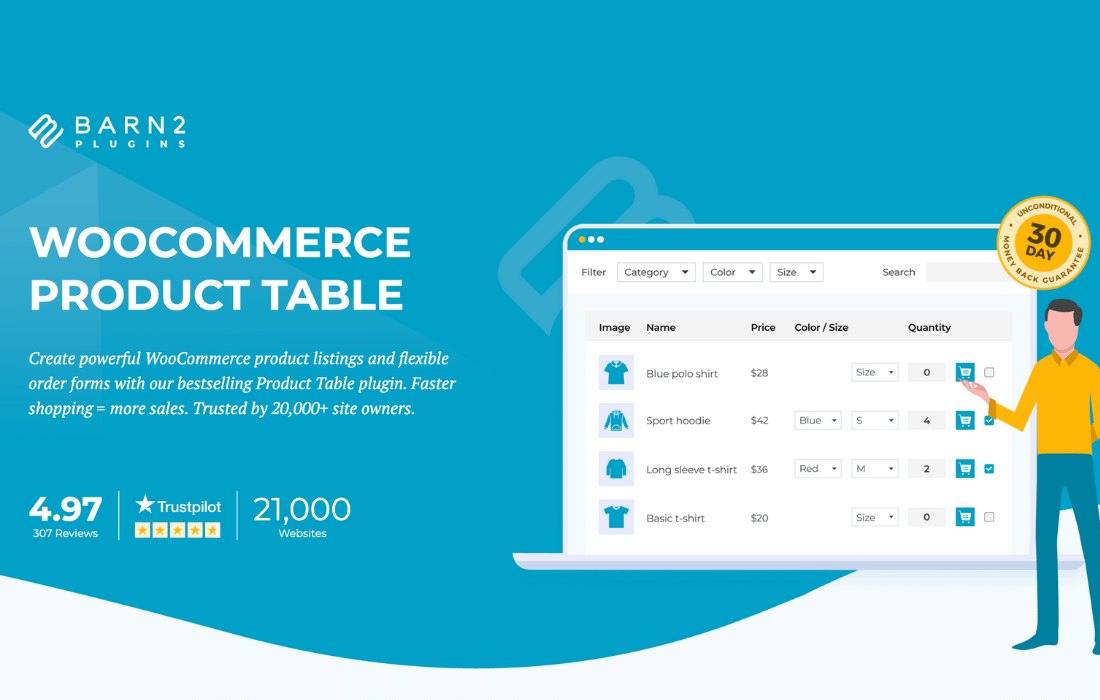
WooCommerce Product Table is a plugin by Barn2 Media Ltd that displays your WooCommerce products in a table layout.
Product facts
- Version
- 5.0.1
- Released
- 23 October 2026
- Type
- Plugin
- Licence
- GPL
- Included in
- Every plan, or $9.09 / year on its own
Overview
Standard product grids work for small shops, but they get slow to scan when a catalog is large or when buyers know what they want. This plugin replaces that layout with a table where each row is a product and each column shows a detail such as SKU, price, image, stock or category. Search, sorting and filtering sit right above the table, so shoppers narrow the list without leaving the page.
You build tables with a step-by-step wizard that needs no coding, then adjust columns, colors, fonts, borders and layout to fit your brand. You can start from one of seven pre-built templates. Tables can be placed on shop pages, category pages or anywhere else through a shortcode or Gutenberg block. This makes the plugin a good fit for wholesale, quick reorders and menu-style ordering.
Features
- Step-by-step table builder: A wizard guides you through creating a product table without writing code, so store owners can set up the content and settings they want in a few steps.
- Search, sort and filter: Customers can search the table, sort by column and filter the list to find products fast. Search covers SKUs, categories, tags, attributes and custom field values.
- One-page bulk ordering: Shoppers can add multiple products and variations to the cart from a single page, using quantity selectors and add to cart buttons placed directly in the table.
- Customizable columns: Show product details such as SKU, price, images, videos, stock, categories and custom attributes. You can also merge columns into single cells and rename column headings.
- Seven pre-built templates: Pick from seven ready-made designs, then change colors, fonts, borders and layouts so the table matches your site's branding.
- Responsive layout: Product tables adapt to desktop, tablet and smartphone screens, so customers can browse and order on whichever device they use.
- Lazy loading for big catalogs: AJAX lazy loading lets you list hundreds or thousands of products in one table without loading everything at once.
- Multiple tables anywhere: Create as many tables as you need, each with its own content and settings, and place them on shop pages, category pages or elsewhere using shortcodes or Gutenberg blocks.
Best for
- Wholesale stores that need fast bulk ordering
- WooCommerce shops with large product catalogs
- Restaurants and stores selling by menu or list
Changelog
Version 5.0.1 — 23 October 2026
- Improved Improved initial loading and responsiveness of large tables on the new frontend.
- Fixed Legacy shortcode attributes being ignored on the new frontend.
- Fixed Custom columns added through filters displaying empty cells.
- Fixed Filtered bulk add-to-cart button labels being ignored on the new frontend.
- Fixed Missing adding_to_cart event before bulk add-to-cart requests on the new frontend.
- Fixed Searches missing product and variation SKUs, categories, tags, and configured attribute and custom field values.
- Fixed Variation search results not updating after inherited parent values change.
- Fixed Existing search indexes missing newly configured search fields.
- Fixed Custom column types being lost when using the date_columns shortcode attribute.
- Fixed Alternate row backgrounds not applying in the Default design.
- Fixed Custom CSS targeting the original table container classes no longer applying.
- Fixed The right-hand table border disappearing during horizontal scrolling.
- Fixed Misaligned multi-select checkbox ticks on some themes.
- Fixed Products with default variations being automatically selected on page load.
- Fixed WooCommerce Discount Manager updates selecting products the customer had unchecked.
- Fixed Clipped quantity pickers and incorrectly sized cart buttons with Blocksy.
- Fixed Stripe payment button placeholders appearing inside product rows.
- Improved Updated internal libraries.
Earlier versions
- 5.0.0 (15 October 2026): 10 new, 1 improved
- 4.3.10 (16 July 2026): 2 improved, 2 fixed
- 4.3.9 (17 June 2026): 3 improved, 3 fixed
FAQ
Is WooCommerce Product Table free?
The code of WooCommerce Product Table is licensed under the GPL, so anyone may use, change and share it. Buy GPL is a paid service: a plan or a purchase of WooCommerce Product Table gives you the download and its updates. The developer's own support, licence key and online services are not included.
Which version of WooCommerce Product Table is this?
Version 5.0.1, released 23 October 2026. New versions appear here when the developer publishes them.
How do I update WooCommerce Product Table?
Install Buy GPL Updater on your site and paste your key from My Account. It installs new versions of WooCommerce Product Table for you.
More from Barn2 Media Ltd
Plugin Plugin
 Plugin
 Plugin
 Plugin
 Plugin
 Plugin
 Plugin