
 Plugin
PluginUpdated
WooCommerce Lead Time
WooCommerce Lead Time is a WooCommerce plugin from Barn2 Media Ltd.
Product facts
- Version
- 2.2.3
- Released
- 20 October 2026
- Type
- Plugin
- Licence
- GPL
- Included in
- Every plan, or $9.09 / year on its own
Overview
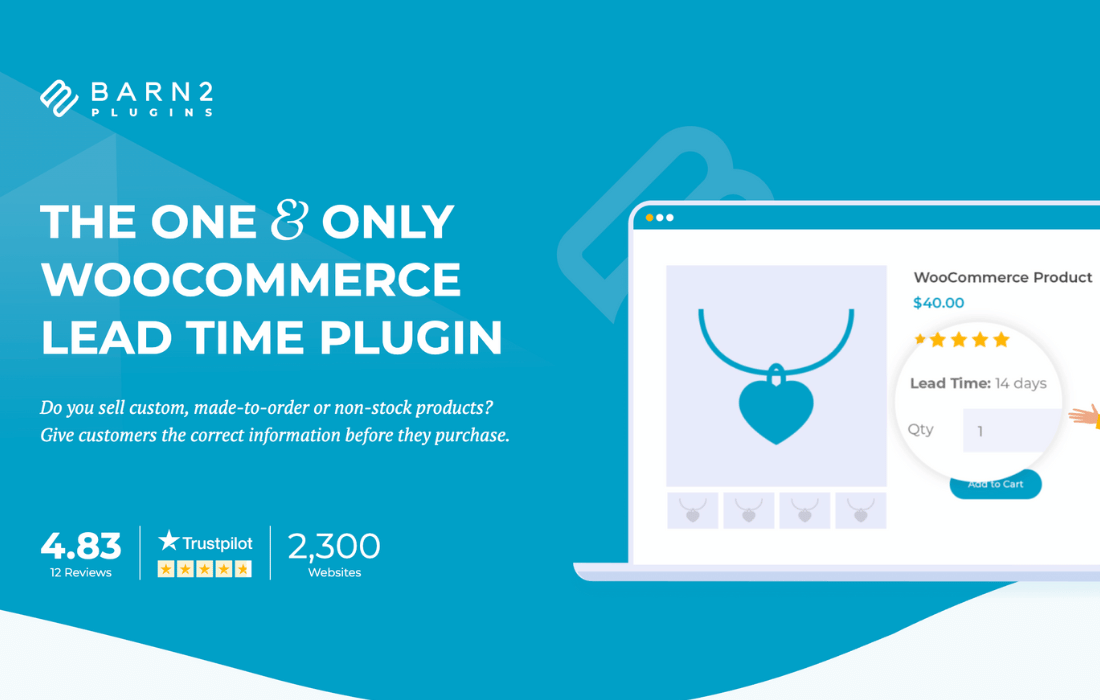
Shoppers who buy custom, hand-made or backorder items often cannot tell when an order will arrive. That uncertainty can lead to questions before and after the purchase. WooCommerce Lead Time answers it by placing processing and delivery information right where customers make their decisions: shop pages, product listings, product detail pages, the cart, checkout and confirmation emails.
You can set one lead time for the whole store or adjust it for individual categories, products and variations. Messages can be fixed text, or they can count toward an estimated date based on the dates you choose. Lead times can also change with stock status, so in-stock, out-of-stock and backorder items each carry their own message. The plugin works with your theme styling and with WooCommerce product table and quick view plugins.
Features
- Lead times across the store: Show lead times on shop pages, categories, product detail pages, the cart, checkout and emails, so customers see the same information at each step of buying.
- Global and per-item settings: Set a store-wide lead time, then override it for a category, a single product or a specific variation to match your inventory and production needs.
- Static and dynamic messages: Use a fixed message, or select dates so the plugin calculates the waiting period and shows a countdown toward the expected delivery date.
- Stock status lead times: Configure separate lead times for in-stock, out-of-stock and backorder products, so each situation gets a message that fits it.
- Sold-out product messages: Display a lead time message as soon as an item sells out, which tells customers what to expect when they want it anyway.
- Custom wording and colors: Edit the lead time text and choose text colors so the message matches your brand voice and the design of your site.
- Product table compatibility: Works with WooCommerce product table and quick view plugins, and inherits your theme's style so lead times look consistent.
- Hide lead time on variations: A Hide lead time checkbox on the variation panel lets you keep the message off specific variations when it does not apply.
Best for
- WooCommerce stores selling custom or hand-made items
- Shops that take backorders on out-of-stock products
- Merchants who want shipping times shown at checkout
Changelog
Version 2.2.3 — 19 October 2026
- Fixed The "Hide lead time" checkbox label and layout on the variation panel.
- Improved Updated internal libraries and tested up to the latest WooCommerce and WordPress version.
- Improved Updated the translation (POT) file.
Earlier versions
- 2.2.2 (28 July 2026): 2 new, 1 improved
- 2.2.1 (10 February 2026): 1 fixed
- 2.2.0 (20 January 2026): 1 new, 3 improved
FAQ
Is WooCommerce Lead Time free?
The code of WooCommerce Lead Time is licensed under the GPL, so anyone may use, change and share it. Buy GPL is a paid service: a plan or a purchase of WooCommerce Lead Time gives you the download and its updates. The developer's own support, licence key and online services are not included.
Which version of WooCommerce Lead Time is this?
Version 2.2.3, released 20 October 2026. New versions appear here when the developer publishes them.
How do I update WooCommerce Lead Time?
Install Buy GPL Updater on your site and paste your key from My Account. It installs new versions of WooCommerce Lead Time for you.
More from Barn2 Media Ltd
Plugin Plugin
 Plugin
 Plugin
 Plugin
 Plugin
 Plugin
 Plugin