
 Plugin
PluginUpdated
GP Page Transitions
GP Page Transitions is a Gravity Forms add-on from Gravity Wiz, part of the Gravity Perks family.
Product facts
- Version
- 1.0.52
- Released
- 29 October 2026
- Type
- Plugin
- Licence
- GPL
- Included in
- Every plan, or $4.89 on its own
Overview
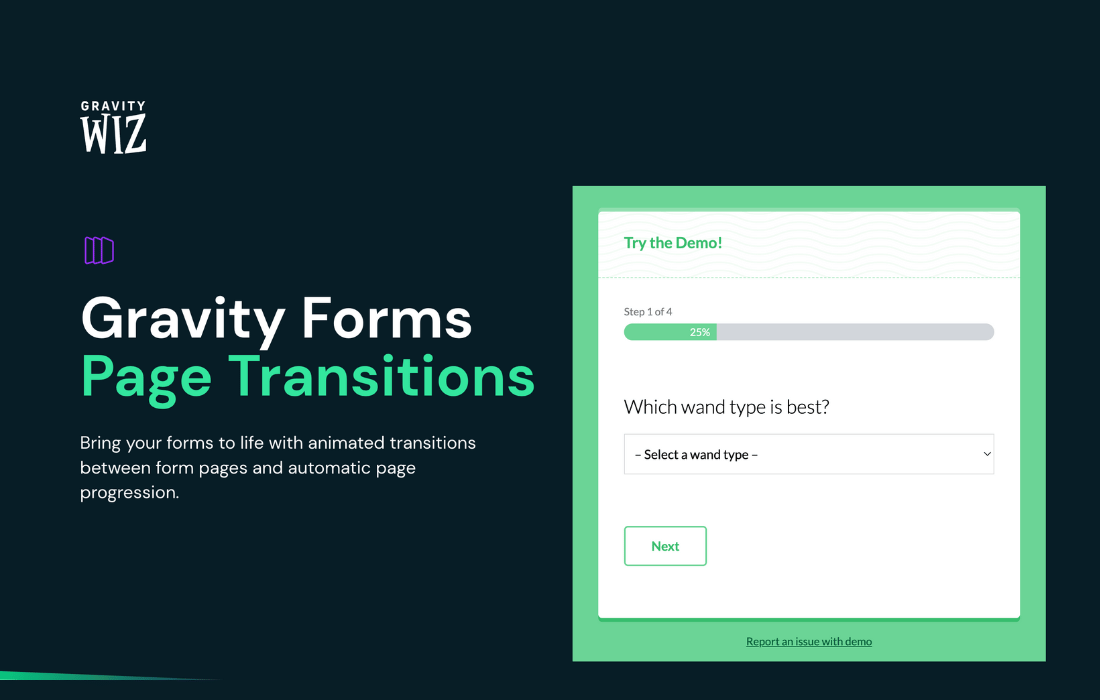
Multi-page forms can feel choppy when each step simply reloads with a hard cut. GP Page Transitions addresses this with built-in slide and fade animations that play as people move from one step to the next. The plugin works inside Gravity Forms, so you turn features on and adjust them from the form's page settings rather than learning a separate tool.
The plugin also changes how people move through a form. When a respondent finishes the final field on a page, the form can move them ahead on its own, and you can hide the Next and Previous buttons to rely on that behavior. Soft validation checks required fields in the browser to catch obvious mistakes early. An animated progress bar and page steps show where someone is in the form, and mobile behavior is tuned for touch and keyboards.
Features
- Animated page transitions: Slide and fade animations play between the pages of a multi-page Gravity Forms form, giving each step a smoother, more polished look as respondents move through it.
- Auto-progression: Once someone completes the last field on a page, the form moves them forward on its own, which removes the need to press a button after every step.
- Soft validation: Required fields are checked in the browser, so obvious mistakes surface early without forcing people to submit each page before they can continue.
- Animated progress bar and steps: Progress indicators are animated and highlight the respondent's current position, helping people see where they are within a longer multi-step form.
- Hide Next and Previous buttons: Navigation buttons can be removed so that moving through the form depends on completing fields, which suits a more interactive, guided flow.
- Gravity Forms page settings: Features are switched on and configured from the Gravity Forms page settings, so setup and ongoing management stay in the place you already work.
- Mobile-aware behavior: Input focusing, touch interactions and mobile keyboards are handled with extra care, so forms behave sensibly on phones and tablets.
- Works with other Gravity Perks: It is designed to run alongside other Gravity Perks add-ons, including GP Populate Anything and GP Multi-Page Navigation.
Best for
- Sites running long multi-page Gravity Forms forms
- Agencies building guided application or survey forms
- Form builders who want smoother mobile form steps
Changelog
Version 1.0.52 — 28 October 2026
- Fixed Fixed an issue where conditionally visible fields could be excluded from submission when using Soft Validation, causing calculation fields to save incorrect values.
Earlier versions
- 1.0.51 (15 October 2026): 1 fixed
- 1.0.50 (17 September 2026): 2 fixed
- 1.0.49 (9 September 2026): 1 fixed
FAQ
Is GP Page Transitions free?
The code of GP Page Transitions is licensed under the GPL, so anyone may use, change and share it. Buy GPL is a paid service: a plan or a purchase of GP Page Transitions gives you the download and its updates. The developer's own support, licence key and online services are not included.
Which version of GP Page Transitions is this?
Version 1.0.52, released 29 October 2026. New versions appear here when the developer publishes them.
How do I update GP Page Transitions?
Install Buy GPL Updater on your site and paste your key from My Account. It installs new versions of GP Page Transitions for you.
More from Gravity Wiz
Plugin Plugin
 Plugin
 Plugin
 Plugin
 Plugin
 Plugin
 Plugin