
 Plugin
PluginUpdated
Gravity Perks Word Count
Gravity Perks Word Count is a WordPress plugin by Gravity Wiz that adds word limits to Gravity Forms.
Product facts
- Version
- 1.6.10
- Released
- 12 March 2026
- Type
- Plugin
- Licence
- GPL
- Included in
- Every plan, or $4.19 / year on its own
Overview
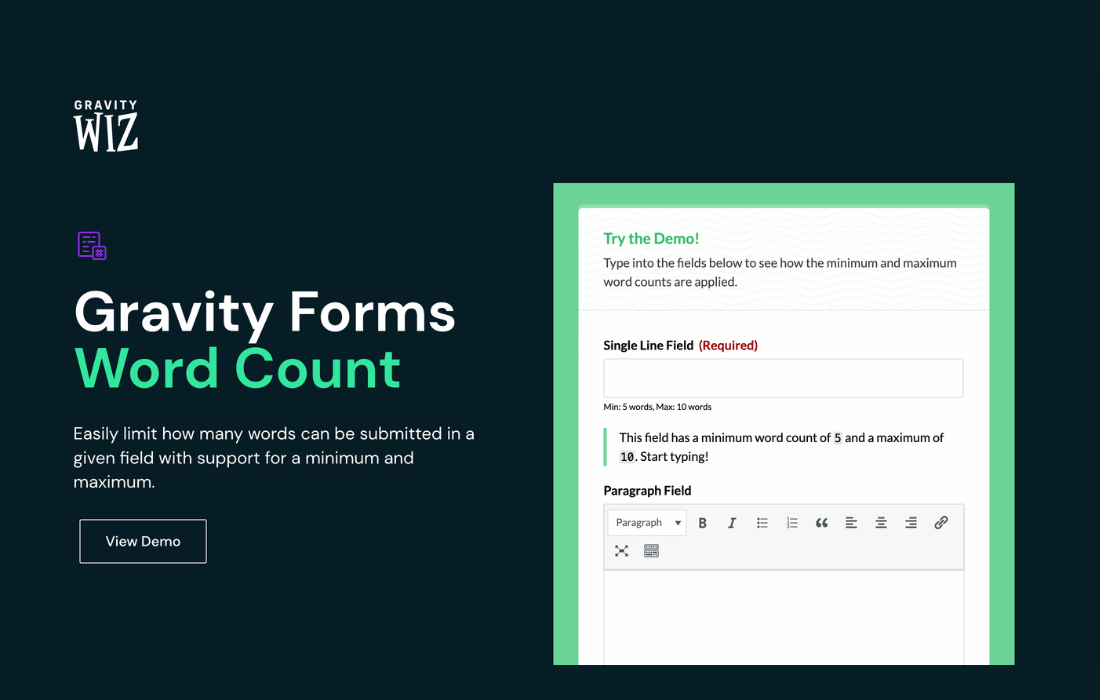
Forms that collect written answers often get responses that are too short to be useful or too long to review. Gravity Perks Word Count handles this by letting you set word limits on Single Line Text, Paragraph, Post Body and Post Excerpt fields. Visitors see their word count as they type, so they know where they stand before they submit.
The plugin checks each entry against the limits you set and stops submissions that fall outside them. It respects conditional logic and hidden fields, so fields that are not shown do not cause errors. It fits article submissions, job applications, surveys and feedback forms, and it can be combined with Gravity Forms Pay Per Word for pricing based on word count.
Features
- Minimum and maximum limits: Set a lowest word count, a highest word count, or both, on each text field so responses meet the length standard you define for your form.
- Several field types: Works with Single Line Text, Paragraph, Post Body, Post Excerpt and Post Title fields, so one plugin covers most text input in Gravity Forms.
- Live word counter: Visitors see their word count update as they type, which helps them correct the length before they try to submit the form.
- Counters under the field: Choose to display minimum and maximum word counters below a field, with customizable labels and truncation behavior available through filters.
- Submission validation: Entries that do not meet the word count rules are blocked, so the responses you receive match the requirements you set.
- Respects conditional logic: Validation takes conditional logic and hidden fields into account, which avoids needless errors on fields the visitor never sees.
- Optional fields stay optional: A minimum word count does not turn an optional field into a required one, so visitors can still skip fields that are meant to be skipped.
- Works with Pay Per Word: Pair word limits with Gravity Forms Pay Per Word to price content submissions by the number of words entered.
Best for
- Sites collecting essays or article submissions
- Job application and survey forms with length rules
- Gravity Forms users who need word-based pricing
Changelog
Version 1.6.10 — 11 March 2026
- Fixed Fixed an issue where minimum word count validation made optional fields behave as required.
Earlier versions
- 1.6.9 (10 September 2025): 1 improved
- 1.6.8 (4 June 2025): 1 improved
- 1.6.7 (14 May 2025): 1 removed
FAQ
Is Gravity Perks Word Count free?
The code of Gravity Perks Word Count is licensed under the GPL, so anyone may use, change and share it. Buy GPL is a paid service: a plan or a purchase of Gravity Perks Word Count gives you the download and its updates. The developer's own support, licence key and online services are not included.
Which version of Gravity Perks Word Count is this?
Version 1.6.10, released 12 March 2026. New versions appear here when the developer publishes them.
How do I update Gravity Perks Word Count?
Install Buy GPL Updater on your site and paste your key from My Account. It installs new versions of Gravity Perks Word Count for you.
More from Gravity Wiz
Plugin Plugin
 Plugin
 Plugin
 Plugin
 Plugin
 Plugin
 Plugin