
 Plugin
PluginUpdated
Gravity Perks Expand Textareas
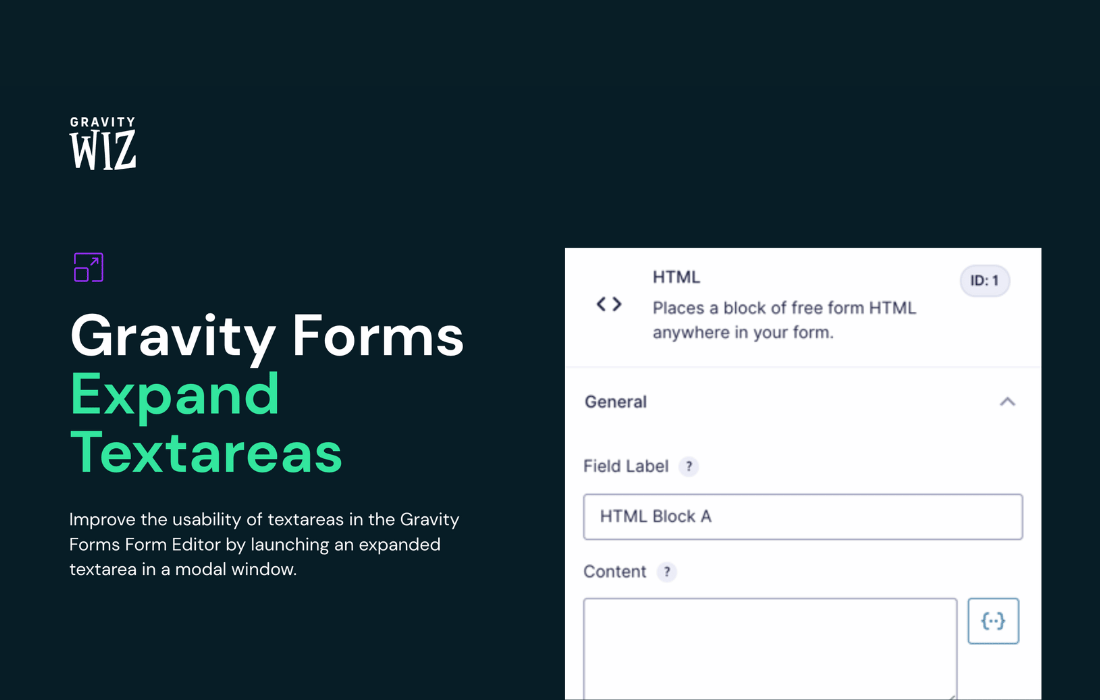
Gravity Perks Expand Textareas is a WordPress plugin from Gravity Wiz that adds an expanded editing window to textareas in the Gravity Forms form editor.
Product facts
- Version
- 1.1.5
- Released
- 28 August 2026
- Type
- Plugin
- Licence
- GPL
- Included in
- Every plan, or $4.89 / year on its own
Overview
Textareas in the Gravity Forms form editor can feel cramped when you are working with a lot of content. A long HTML block, a calculation formula or a post body template is hard to read and edit in a small box. Gravity Perks Expand Textareas solves this by opening the textarea in a larger modal window, so you can see and change more of your content at once.
The plugin is built for WordPress administrators and form creators who spend time inside the form editor. It is set up by default for the fields that benefit most from extra space, and you can configure it to expand any textarea in the editor. It can also open the modal automatically when you focus on a textarea, which removes an extra click. It is part of the Gravity Perks family and works within Gravity Forms.
Features
- Larger modal editing window: Opens a textarea in the form editor inside an expanded modal window, which makes long or complex content easier to read and edit.
- Automatic expansion on focus: The expanded modal can launch as soon as a textarea gains focus, so you reach the larger editor without any extra clicks.
- HTML content support: Works out of the box with HTML content settings, giving you more room to write and review markup inside your forms.
- Calculation formula support: Calculation formulas can be edited in the expanded window, which helps when a formula runs long and needs careful reading.
- Post body content support: Post body templates are covered by default, so longer content in those settings opens in the larger view.
- Works with any textarea setting: Beyond the default fields, you can activate the expand option on any textarea-based field setting in the form editor.
- Configurable scope: Add the expand option to all textareas in your forms or limit it to the ones you choose, to match the way you work.
- Insert and save workflow: Change your content inside the modal and save it straight back to the form, with no extra steps between editing and saving.
Best for
- Form builders who write long HTML in Gravity Forms
- Admins editing complex calculation formulas in forms
- Agencies building content-heavy Gravity Forms for clients
Changelog
Version 1.1.5 — 27 August 2026
- Fixed Fixed an issue where the Expand Textarea button overlapped the GP Advanced Calculations formula editor.
Earlier versions
- 1.1.4 (14 May 2025): 1 improved
- 1.1.3 (19 September 2024): 1 fixed
- 1.1.2 (14 August 2024): 1 improved
FAQ
Is Gravity Perks Expand Textareas free?
The code of Gravity Perks Expand Textareas is licensed under the GPL, so anyone may use, change and share it. Buy GPL is a paid service: a plan or a purchase of Gravity Perks Expand Textareas gives you the download and its updates. The developer's own support, licence key and online services are not included.
Which version of Gravity Perks Expand Textareas is this?
Version 1.1.5, released 28 August 2026. New versions appear here when the developer publishes them.
How do I update Gravity Perks Expand Textareas?
Install Buy GPL Updater on your site and paste your key from My Account. It installs new versions of Gravity Perks Expand Textareas for you.
More from Gravity Wiz
Plugin Plugin
 Plugin
 Plugin
 Plugin
 Plugin
 Plugin
 Plugin