
 Plugin
PluginUpdated
Thrive Apprentice
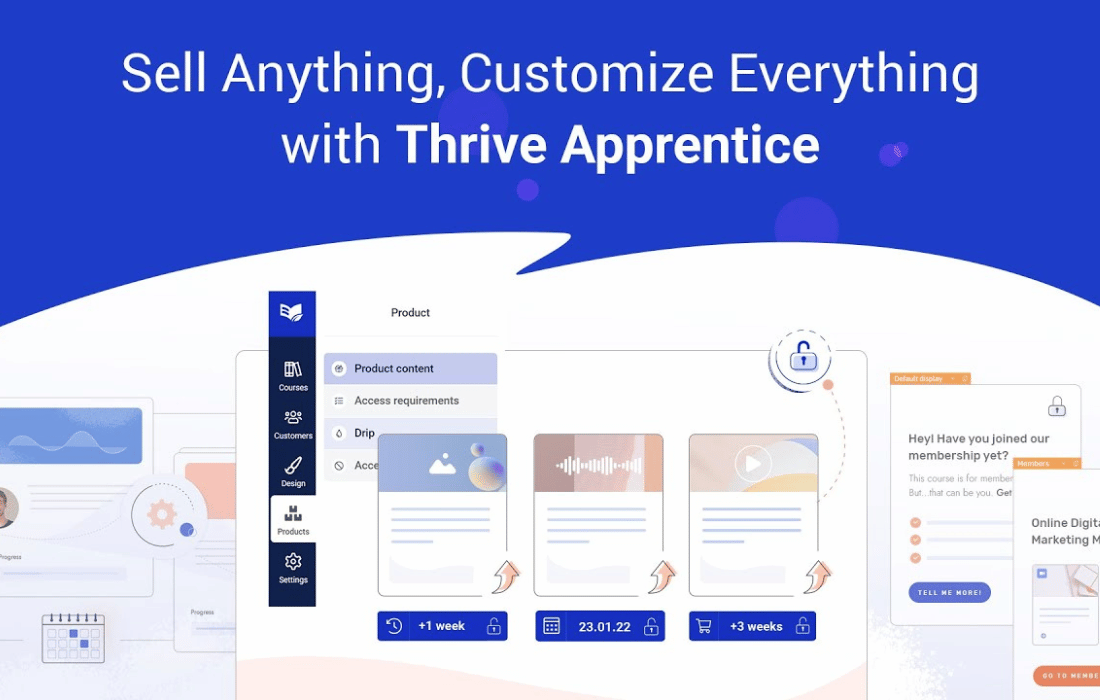
Thrive Apprentice is a WordPress learning management plugin from Thrive Themes.
Product facts
- Version
- 11.3
- Released
- 5 November 2026
- Type
- Plugin
- Licence
- GPL
- Included in
- Every plan, or $6.29 / year on its own
Overview
Many learning management systems are heavy and take time to learn. Thrive Apprentice takes a lighter route. It runs as a plugin on your WordPress site, so your courses live next to the rest of your content and share its look. You build courses from lessons and modules with a drag-and-drop builder, then present them in a student-friendly layout that is easy to read and navigate.
You decide how students move through the material. Drip-feed scheduling releases content at the pace you set, and access control restricts lessons to enrolled students or subscribers. The plugin works with membership plugins and lets you attach downloadable PDFs or bonus resources to lessons. It suits entrepreneurs, educators and businesses that want control over branding and a straightforward learning experience.
Features
- Drag-and-drop course builder: Create and organize lessons, modules and whole courses with a drag-and-drop interface, so the structure of a course is easy to arrange and change.
- Drip-feed scheduling: Control how and when students get access to course materials, so learners move through the content at the pace you choose.
- Matches your site design: The plugin inherits your site's style, giving courses a consistent, branded look without additional coding.
- Student-friendly layouts: Lessons are delivered in a clean, distraction-free layout made for readability and simple navigation through the course.
- Customizable design options: Adjust fonts, colors and layouts to fit your brand identity and give the learning area its own look.
- Access control: Restrict content so only enrolled students or subscribers can view it, with compatibility for membership plugins.
- Progress and access analytics: Monitor student progress and access patterns, then use what you see to adjust your course offerings.
- Downloadable lesson resources: Offer PDFs, resources or bonus materials directly inside lessons to add to your course content.
Best for
- Course creators building lessons and modules on WordPress
- Entrepreneurs and educators who want a lightweight course setup
- Businesses that want branded learning areas for members
Changelog
Version 11.3 — 3 November 2026
- Security Security Improvements: This release includes security and stability improvements to keep your site protected.
- New Apprentice Triggers: A new Triggers screen under Apprentice → Settings runs automations when a student gets access, loses access, completes content or has drip content unlock. Each trigger shows how many automations use it.
- Improved Module and Lesson Completion: Completion triggers now fire for modules and lessons as well as courses, from every way content can be completed.
- Improved Same Result From Every Access Source: Access triggers fire the same way for WooCommerce, webhooks, forms, manual grants and the API, and revoke triggers fire for refunds, expired subscriptions and manual removals.
- New Trigger Actions: Automations can add email tags in your email service, send a webhook, start or stop an Ultimatum campaign, or grant access to another Apprentice product.
- Improved Delays and Conditions: Any action can run after a delay you choose, and only when a condition you set is met.
- New Automation Log: Every automation run is logged as run, skipped (with the values checked) or failed.
- Improved Drip Triggers for Modules and Chapters: “When drip content unlocks” now works with drip campaigns that unlock whole modules or chapters, and it flags any target that is no longer on a drip schedule.
- Improved Product Access Expiry: When a product’s access expires, access to the product itself is revoked, not just its courses. Members stay in the Members list when you remove their access and add it back.
- Improved Square Refunds Remove Access: Refunding a one-time Square purchase now removes the course access and shows the refund in the Course Enrollments report.
- Improved Sequential Drip: Under “Force users to complete course in order”, chapters unlock as soon as the student completes the content before them, and new students are no longer locked out of the first lesson.
- Improved PDFs on iPhone and iPad: PDF resources and certificates open correctly on iOS instead of showing code.
- Improved Cloned Course Certificates: Certificates from a duplicated course download with the right design instead of a 404 page.
- Improved Vimeo Share Links: Vimeo’s new share links and unlisted player embed links work in Vimeo lessons. Existing lessons are unchanged.
- Improved Faster Sites With Many Students: Course statistics are no longer loaded on every page, which speeds up sites with many enrolments.
- Improved Stripe Stability: The Apprentice admin loads after you disconnect Stripe, Stripe and Square webhooks no longer fail on PHP 8, and students with a missing Stripe enrolment date get it back on their next renewal.
- Improved Square With Object Caching: Sites with an object cache drop-in no longer lose their REST API (block editor, Site Health, Thrive dashboards) because of the Square integration.
- Improved Square Stays Connected: Square connections now renew themselves in the background, so Square checkout no longer stops working 30 days after you connect.
- Improved No Second Invoice for Square One-Time Purchases: One-time Square purchases no longer also email the buyer an unpaid invoice for the amount they had just paid.
- Improved Square Checkout Phone Numbers: Phone numbers from outside the US and Canada no longer fail at Square checkout, and buyers are asked for the country code when it’s missing.
- Improved Square Payment Confirmation Feedback: If Square can’t confirm a payment straight away, buyers now see a message and a “Try again” button instead of waiting on “Payment Successful!” with no feedback.
- Improved Square Subscription Order Prices: Square subscription purchases are recorded in Apprentice orders with their real price instead of 0.
- Improved Original Stripe Connection: Sites still using the original Stripe connection (API keys pasted into Thrive Dashboard) no longer get a critical error on every admin page.
- Improved Stripe Test Prices and Product Picker: Stripe test-mode prices are updated when an Apprentice product is saved, and archived Stripe products no longer appear in the product picker.
Earlier versions
- 11.2.0.1 (22 October 2026): 1 new, 1 security, 1 other
- 11.2 (21 October 2026): 1 security
- 11.1 (7 October 2026): 2 new, 4 improved, 2 security, 1 other
FAQ
Is Thrive Apprentice free?
The code of Thrive Apprentice is licensed under the GPL, so anyone may use, change and share it. Buy GPL is a paid service: a plan or a purchase of Thrive Apprentice gives you the download and its updates. The developer's own support, licence key and online services are not included.
Which version of Thrive Apprentice is this?
Version 11.3, released 5 November 2026. New versions appear here when the developer publishes them.
How do I update Thrive Apprentice?
Install Buy GPL Updater on your site and paste your key from My Account. It installs new versions of Thrive Apprentice for you.
More from Thrive Themes
Plugin Plugin
 Plugin
 Plugin
 Plugin
 Plugin
 Plugin
 Plugin