
 Plugin
PluginUpdated
LaunchGuard Pro – Coming Soon & Maintenance Mode
LaunchGuard Pro – Coming Soon & Maintenance Mode is a WordPress plugin from bdthemes.
Product facts
- Version
- 1.4.1
- Released
- 12 October 2026
- Type
- Plugin
- Licence
- GPL
- Included in
- Every plan, or $4.89 / year on its own
Overview
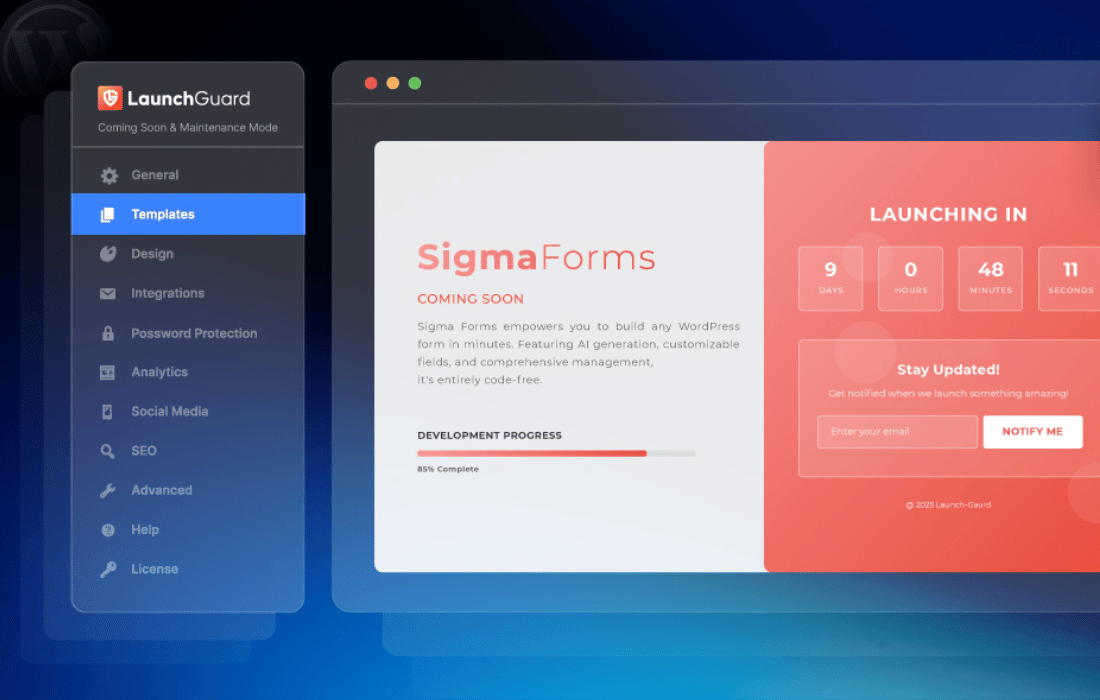
A site that is half built or being updated does not need to be on show. LaunchGuard Pro gives you a page builder for coming soon and maintenance screens, with customizable templates, so you can set up a clear holding page without writing code. You can add your logo, colors and backgrounds so the page matches your brand.
The plugin also helps you stay in touch with visitors. A countdown timer shows when you plan to open, and subscription forms connect with email marketing services so people can leave their address. Access settings let chosen user roles or IP addresses view the full site while everyone else sees the launch page. It suits new builds and updates to existing sites.
Features
- Coming soon and maintenance pages: Build either type of holding page with a page builder and customizable templates, so you can set up a professional-looking screen without coding skills.
- Countdown timer: Add a built-in countdown timer to the page so visitors can see how long until your site goes live.
- Subscription forms: Collect email addresses with integrated subscription forms that connect with popular email marketing services, so you can build a list before launch.
- Role and IP access control: Allow specific user roles or IP addresses to view the live site while other visitors see the launch page.
- Branding options: Set your own logos, colors and backgrounds so the holding page matches your company's look.
- Responsive layouts: Pages are designed to display properly on desktops, tablets and smartphones, so visitors on any device see a tidy screen.
- Multilingual support: Serve visitors in different languages with multilingual support built into the plugin, useful for sites with an international audience.
- Real-time preview: See your changes instantly in a live preview before you publish the page.
Best for
- Developers building client sites behind a launch page
- Site owners taking a site offline for maintenance
- Agencies collecting email leads before a launch
Changelog
Version 1.4.1 — 12 October 2026
- New SEO title now shows as the page title
- New Warning while typing a wrong social link, Analytics ID, Mailchimp field or IP
- Fixed Switching on with a past countdown date turned it back off
- Fixed Backslashes in custom CSS and JS were removed on save
- Fixed Robots.txt and favicon.ico showed the launch page
- Fixed Posts page ignored in Scope
- Fixed Customizer and post preview showed the launch page
- Fixed Maintenance chosen while switched off was not saved
- Fixed Custom template Preview ignored unsaved code
- Fixed Broken social links and Analytics IDs were saved
- Fixed A bad settings import blanked the screen
- Fixed Empty password prompt that ignored Escape
- Security Mailchimp key left out of settings exports
Earlier versions
- 1.4.0 (29 September 2026): 3 new, 2 improved, 3 fixed
- 1.3.0 (16 September 2026): 6 new, 6 improved, 9 fixed, 1 security
- 1.2.5 (22 August 2026): 2 improved, 14 security
FAQ
Is LaunchGuard Pro – Coming Soon & Maintenance Mode free?
The code of LaunchGuard Pro – Coming Soon & Maintenance Mode is licensed under the GPL, so anyone may use, change and share it. Buy GPL is a paid service: a plan or a purchase of LaunchGuard Pro – Coming Soon & Maintenance Mode gives you the download and its updates. The developer's own support, licence key and online services are not included.
Which version of LaunchGuard Pro – Coming Soon & Maintenance Mode is this?
Version 1.4.1, released 12 October 2026. New versions appear here when the developer publishes them.
How do I update LaunchGuard Pro – Coming Soon & Maintenance Mode?
Install Buy GPL Updater on your site and paste your key from My Account. It installs new versions of LaunchGuard Pro – Coming Soon & Maintenance Mode for you.
More from bdthemes
Plugin Plugin
 Plugin
 Plugin
 Plugin
 Plugin
 Plugin
 Plugin