
 Plugin
PluginUpdated
SigmaForms Pro
SigmaForms Pro by bdthemes is a WordPress form builder plugin.
Product facts
- Version
- 1.6.0
- Released
- 20 October 2026
- Type
- Plugin
- Licence
- GPL
- Included in
- Every plan, or $4.89 / year on its own
Overview
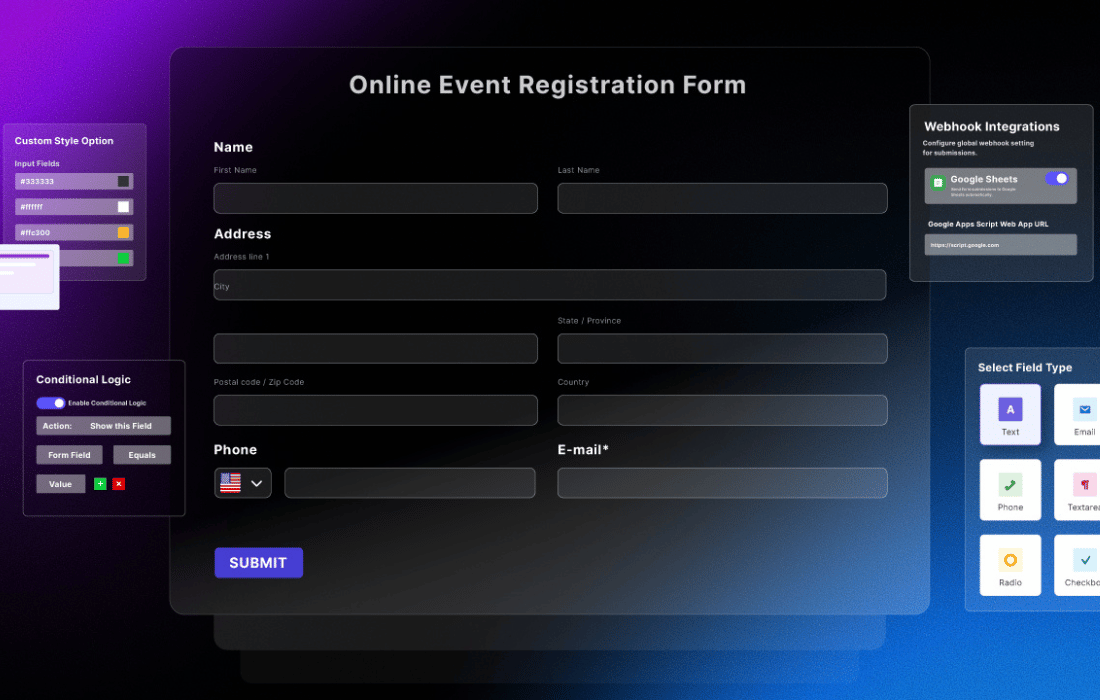
Many sites need forms that look like part of the design, not a generic box bolted onto a page. SigmaForms Pro gives you a visual builder where you add and arrange fields, then adjust colors, fonts, spacing, borders and backgrounds. Layouts can be single column, multi-column or inline, and forms adapt to different screen sizes, including phones and tablets.
Beyond the look, the plugin covers the practical side of collecting data. Conditional logic shows or hides fields based on what a visitor enters. CAPTCHA and honeypot techniques help keep spam out, email notifications and auto-responders keep your team and your users informed, and submissions can be exported to CSV for follow-up. It suits businesses, bloggers and creators who want to manage forms in one place.
Features
- Drag-and-drop form builder: Create and organize form fields in a visual editor. You arrange the form on screen, so there is no need to write code to get a working layout.
- Customizable field types: Choose from fields such as text, email, dropdowns, checkboxes and file uploads, and adjust them to fit contact forms, surveys, lead forms or event registrations.
- Detailed styling controls: Change colors, fonts, spacing, borders and backgrounds so a form matches your brand. A global default form theme can apply to new forms, and to existing ones.
- Flexible layout options: Pick single column, multi-column or inline layouts. Forms are responsive, so they adapt to different screen sizes and devices.
- Conditional logic: Show or hide fields depending on what a visitor enters. This keeps forms shorter and makes them more interactive for the person filling them in.
- Spam protection: Integrated CAPTCHA and honeypot techniques help keep bots and spam submissions out of your forms and your inbox.
- Email notifications and auto-responders: Notify your team when a form is submitted and send an automatic reply to the user. Filters let developers adjust details such as the sender address.
- CSV export of submissions: Export form submissions to CSV for handling and follow-up elsewhere. The export includes per-field columns, which keeps the data organized.
Best for
- Business sites that need contact and lead capture forms
- Bloggers and creators building surveys or registrations
- Site owners who want styled forms without coding
Changelog
Version 1.6.0 — 19 October 2026
- Security Hardened public form endpoints, hid the saved SMTP password, tightened permission checks and randomised upload file names
- New Per-field columns in the submissions CSV export
- New Styled confirm dialogs and notices in the admin
- New Sigmaforms_abandoned_session_limit filter
- New Sigmaforms_email_from_address filter
- New Option to remove the saved SMTP password
- New "Global default" form theme for new forms, and an "Apply to all existing forms" option in Form Styling
- Improved Sigmaforms_manage_forms_capability now covers admin menus and AJAX
- Improved Webhooks are sent after the response; emails use the site's From address and reply to the submitter
- Improved Form scripts and the abandonment tracker load only where needed; about 30 fewer scripts on admin screens
- Improved Submission indexes on status and date, added right after updating
- Improved Form editor: choice options as condition values, duplicates placed after the original, form IDs in filters
- Improved Wrong file types are reported when the file is picked
- Improved New forms store submissions by default
- Fixed Expired nonces broke submissions, and a double-click could submit twice
- Fixed Multi-step forms: blocking alert, skipped required radios and invalid emails, hidden required fields blocking Next, and a page break at the end hiding the form
- Fixed Required fields hidden by conditional logic blocked the submission; "User Data" conditions never matched on the front end
- Fixed CSV rows broke on quotes; SMTP passwords with special characters or "0" were not saved as typed
- Fixed Abandoned tracking failed on cached pages and returned 500 for invalid requests
- Fixed Admin: `admin.js` loaded twice, vague session-expired error, raw AI debug output, untranslatable messages and `'` in translations
- Fixed Block editor preview was unstyled and the legacy block loaded a broken script
- Fixed Choosing a theme in Settings had no effect on existing forms, and forms on the global Custom theme kept their old colours
- Fixed REST submissions ignored the form's success message, unrated Ratings saved as 0, missed radios showed no error, and uninstall left license transients
Earlier versions
- 1.5.0 (27 September 2026): 2 new, 3 improved, 9 fixed
- 1.4.12 (25 August 2026): 1 improved, 2 security
- 1.4.11 (22 August 2026): 2 improved, 7 security
FAQ
Is SigmaForms Pro free?
The code of SigmaForms Pro is licensed under the GPL, so anyone may use, change and share it. Buy GPL is a paid service: a plan or a purchase of SigmaForms Pro gives you the download and its updates. The developer's own support, licence key and online services are not included.
Which version of SigmaForms Pro is this?
Version 1.6.0, released 20 October 2026. New versions appear here when the developer publishes them.
How do I update SigmaForms Pro?
Install Buy GPL Updater on your site and paste your key from My Account. It installs new versions of SigmaForms Pro for you.
More from bdthemes
Plugin Plugin
 Plugin
 Plugin
 Plugin
 Plugin
 Plugin
 Plugin