
 Plugin
PluginUpdated
Iconic Image Swap for WooCommerce
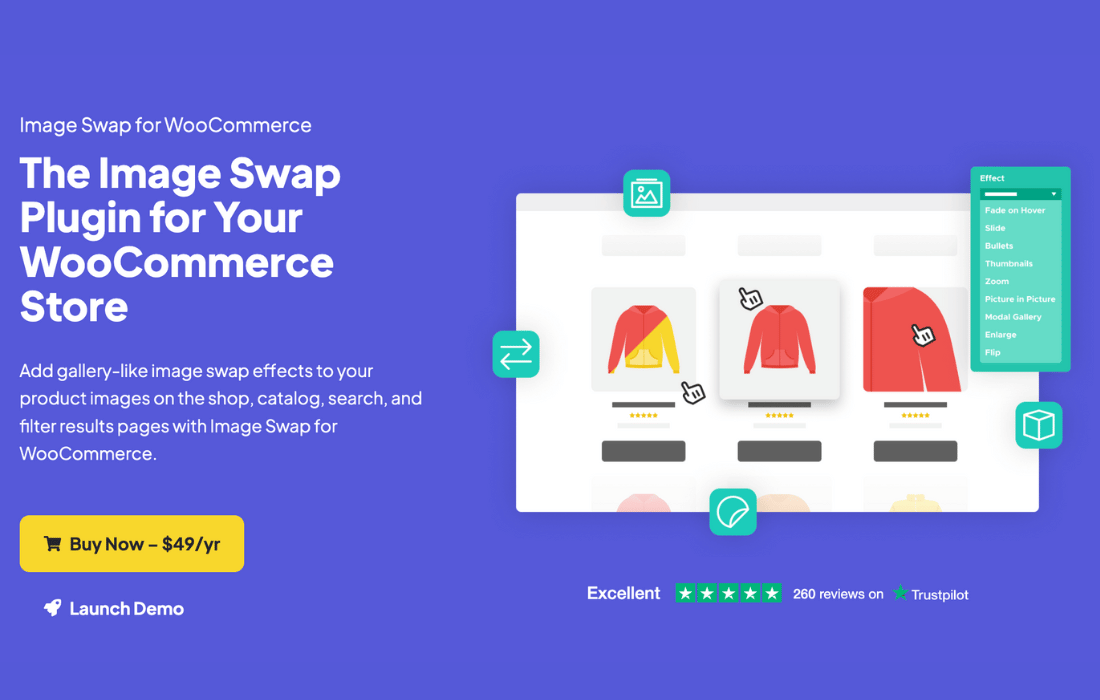
Iconic Image Swap for WooCommerce is a plugin by Iconic that lets shoppers see alternate product photos right on listing pages.
Product facts
- Version
- 2.13.0
- Released
- 3 September 2025
- Type
- Plugin
- Licence
- GPL
- Included in
- Every plan, or $4.89 / year on its own
Overview
Product listings usually show one image per item. Shoppers who want another angle must click through to the product page, then go back. Iconic Image Swap for WooCommerce adds gallery-style effects to shop, catalog, search and filter results pages, so extra photos appear where people are already browsing.
You pick from nine animation effects and adjust each one to suit your brand and theme, with no coding required. The plugin works with well-coded WooCommerce themes and popular page builders such as Elementor, and it fits block-based shop layouts. That makes it a practical choice for stores with many products that look different from several sides.
Features
- Nine image swap effects: Choose from Fade, Slide, Bullets, Thumbnails, Zoom, Picture-in-Picture, Modal Gallery, Enlarge and Flip to decide how alternate product images appear on listings.
- Adjustable effect settings: Change details of each effect, including transition speed, navigation style, image count and layout, so the interaction matches the look of your store.
- Hover and navigation controls: Turn on fade-on-hover or slide navigation with arrows or bullets, letting customers browse product variations without leaving the listing page.
- Zoom on hover: Customers can zoom into a product image as they hover over it, which helps them check texture, detail and finish directly in the product grid.
- Picture-in-Picture preview: An alternate image appears embedded within the main image, giving shoppers a quick second view of the product without changing the whole picture.
- Modal gallery viewing: Shoppers can open a large modal window to examine product images at full size, which suits products where detail matters.
- Works on listing pages: Effects apply on shop, catalog, search and filter results pages, so alternate photos show wherever products are listed.
- Theme and builder compatibility: Use it with well-coded WooCommerce themes, Elementor and other popular page builders, and with block-based shop layouts, all configured through a simple interface.
Best for
- WooCommerce stores with products shown from several angles
- Fashion, home and gadget shops with variant photos
- Store owners who want settings without writing code
Changelog
Version 2.13.0 — 1 September 2025
- New Compatibility with Salient theme
- Fixed Sale badge not showing on block themes
Earlier versions
- 2.12.1 (28 April 2025): 1 improved
- 2.12.0 (19 February 2025): 1 improved
- 2.11.0 (19 November 2024): 1 fixed
FAQ
Is Iconic Image Swap for WooCommerce free?
The code of Iconic Image Swap for WooCommerce is licensed under the GPL, so anyone may use, change and share it. Buy GPL is a paid service: a plan or a purchase of Iconic Image Swap for WooCommerce gives you the download and its updates. The developer's own support, licence key and online services are not included.
Which version of Iconic Image Swap for WooCommerce is this?
Version 2.13.0, released 3 September 2025. New versions appear here when the developer publishes them.
How do I update Iconic Image Swap for WooCommerce?
Install Buy GPL Updater on your site and paste your key from My Account. It installs new versions of Iconic Image Swap for WooCommerce for you.
More from Iconic
Plugin Plugin
 Plugin
 Plugin
 Plugin
 Plugin
 Plugin
 Plugin