
 Plugin
PluginUpdated
WooCommerce Delivery Slots
WooCommerce Delivery Slots is a plugin by Iconic that adds delivery and pickup scheduling to a WooCommerce store.
Product facts
- Version
- 2.13.0
- Released
- 11 May 2026
- Type
- Plugin
- Licence
- GPL
- Included in
- Every plan, or $5.59 / year on its own
Overview
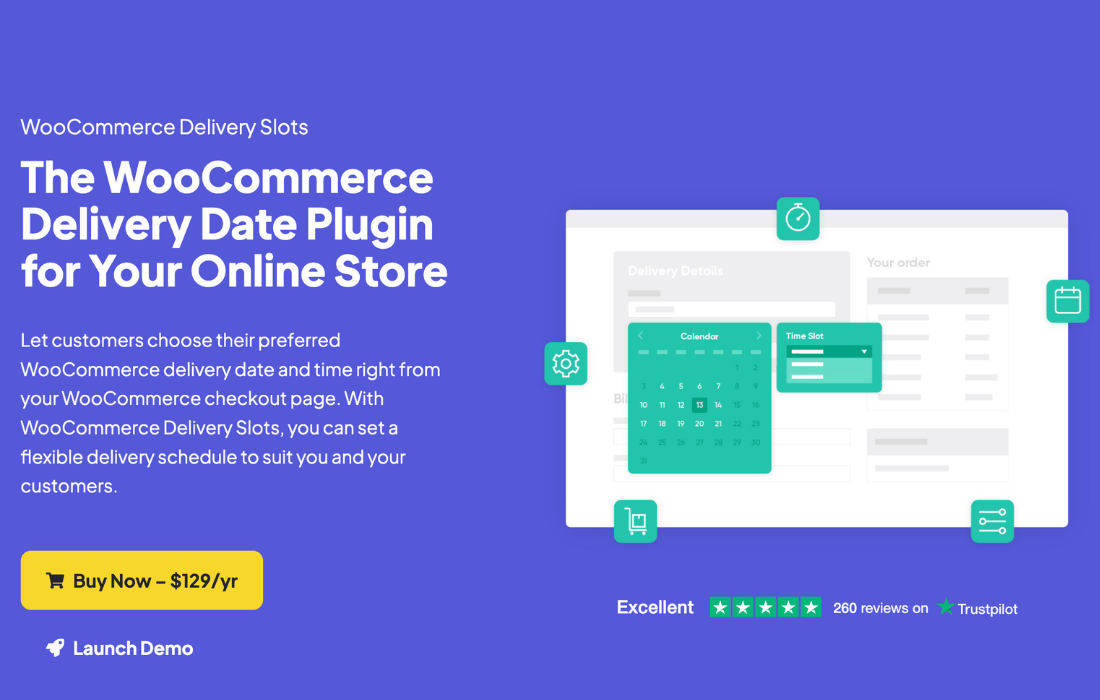
Stores that deliver or offer pickup often need to know when an order should go out and how many can be handled at once. WooCommerce Delivery Slots handles this by showing customers a calendar at checkout where they select a preferred date and time. Merchants define the delivery and pickup slots, set order limits per slot, and block out holidays or other closed dates so customers cannot book a time the store cannot meet.
The plugin supports more detailed rules as well. Slots can be assigned to specific shipping methods, locations or ZIP codes, and delivery dates can be restricted for certain products or categories in the cart. Extra fees can apply to same-day, next-day or particular time slots. An upcoming orders dashboard lets staff view scheduled deliveries and edit the slot on an order from the WooCommerce order screens.
Features
- Custom delivery and pickup slots: Define the specific delivery and pickup time slots that match how your business works, so customers choose from times you can actually fulfill.
- Calendar picker at checkout: Customers select their preferred delivery or pickup date and time from a calendar interface during checkout, with multiple calendar designs and adjustable date formats.
- Order limits per slot: Set a maximum number of orders for each time slot to avoid overbooking and keep delivery capacity under control.
- Extra fees for dates and times: Charge variable fees for same-day, next-day, specific time slots or weekdays, so pricing can reflect the cost of faster or busier deliveries.
- Holiday and closed date controls: Disable delivery or pickup on holidays and custom closed dates, which prevents scheduling conflicts and keeps expectations clear for customers.
- Shipping method and zone rules: Assign slots to particular shipping methods, locations or ZIP codes, and restrict delivery dates based on products or categories in the cart.
- Slot reservation with expiry: Customers can reserve a delivery slot before they start shopping. Custom expiration times release the slot automatically if the order is not completed.
- ASAP option and cutoff times: Offer an as-soon-as-possible choice for urgent orders, and disable slots a set number of minutes before they start to leave time for processing.
Best for
- WooCommerce stores offering local delivery
- Shops with in-store pickup and limited capacity
- Merchants charging extra for same-day delivery
Changelog
Version 2.13.0 — 20 April 2026
- Fixed Issue where the reservation table wouldn't save the date when the cart is empty
- Fixed Fix bug with subscription product where the date would appear incorrect after selecting in the time slot picker for certain timeslots
- Fixed Add defensive check to prevent PHP warnings in get_chosen_shipping_method()
- Fixed Validation error for Stripe Express Checkout
Earlier versions
- 2.12.0 (14 January 2026): 3 fixed
- 2.11.0 (18 November 2025): 1 improved, 3 fixed
- 2.10.0 (23 October 2025): 1 new, 4 fixed
FAQ
Is WooCommerce Delivery Slots free?
The code of WooCommerce Delivery Slots is licensed under the GPL, so anyone may use, change and share it. Buy GPL is a paid service: a plan or a purchase of WooCommerce Delivery Slots gives you the download and its updates. The developer's own support, licence key and online services are not included.
Which version of WooCommerce Delivery Slots is this?
Version 2.13.0, released 11 May 2026. New versions appear here when the developer publishes them.
How do I update WooCommerce Delivery Slots?
Install Buy GPL Updater on your site and paste your key from My Account. It installs new versions of WooCommerce Delivery Slots for you.
More from Iconic
Plugin Plugin
 Plugin
 Plugin
 Plugin
 Plugin
 Plugin
 Plugin