 Theme
ThemeUpdated
Yogamo
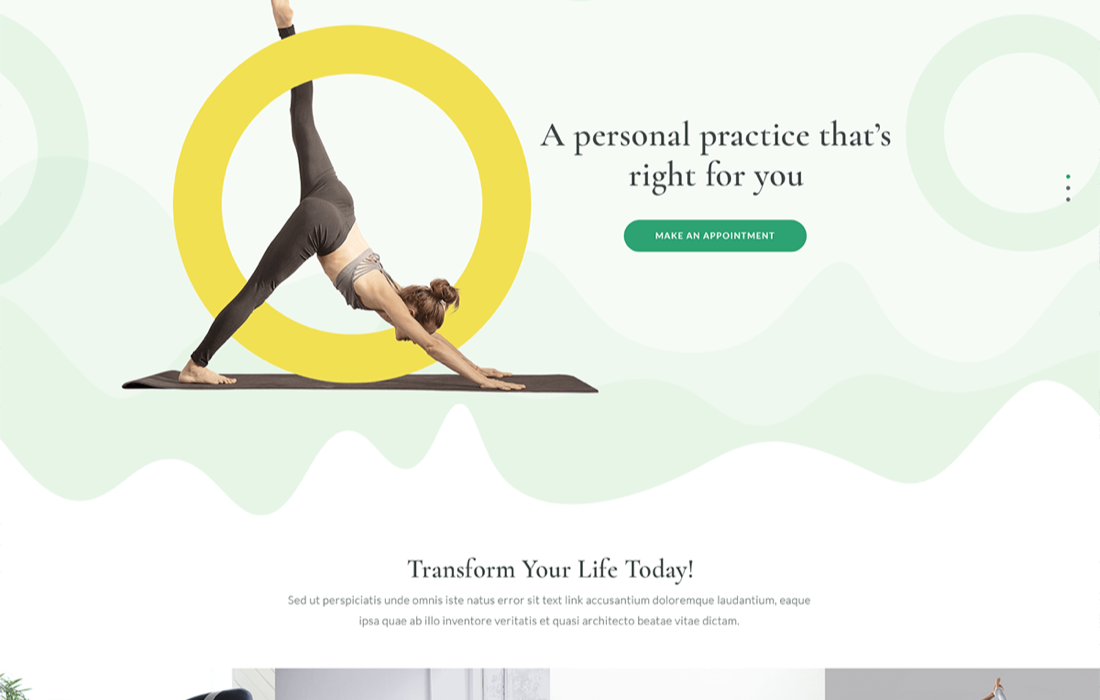
Yogamo is a WordPress theme made for yoga studios, fitness centers, dance schools and wellness businesses.
Product facts
- Version
- 1.3.3
- Released
- 8 February 2024
- Type
- Theme
- Licence
- GPL
- Included in
- Every plan, or $4.19 / year on its own
Overview
Studios often juggle a website, a schedule and a booking process that live in separate places. Yogamo brings them together. The theme includes the MotoPress Appointment Booking plugin, so visitors can reserve individual or group sessions online while you manage schedules, payments and client details from one place.
The design is clean and modern, and pages are built with native Gutenberg blocks plus Getwid blocks. You can create pages for instructors, classes, facilities and pricing, and the layout is responsive and retina-ready. It works for a single studio as well as a business with several locations, since the booking system supports unlimited services, staff members and locations.
Features
- Built-in appointment booking: The MotoPress Appointment Booking plugin is integrated, letting clients book sessions online with a few clicks, for individual or group classes, while you manage everything in one place.
- Unlimited services and locations: Add as many services, staff members and locations as your business needs, including virtual or physical class locations with video conferencing integration for remote sessions.
- Flexible reservation types: Offer one-to-one, group and multi-slot reservations, and set buffer times between appointments to reduce scheduling conflicts.
- Customizable booking wizard: The responsive booking wizard has editable fields, so you can shape the booking experience to match what your studio needs to collect from clients.
- Online payments: Accept payments through WooCommerce, Square and other popular gateways. The system also supports discount coupons for promotional campaigns.
- Email notifications and reminders: Automated emails keep clients and staff informed about bookings, and reminders help reduce no-shows.
- Reports and CSV export: Review bookings and business performance through reporting and analytics, filter bookings by date, service, location or employee, and export booking data as a CSV file.
- Block-based page design: Pages are built with Gutenberg blocks and more than 40 Getwid blocks, with customizable layouts for instructors, classes, facilities and pricing, plus a customer login area for clients.
Best for
- Yoga studios and fitness centers taking online class bookings
- Dance schools and wellness businesses with several staff or locations
- Studio owners who want to build pages with the block editor
Changelog
Version 1.3.3 — 30 November 2023
- Improved Appointment Booking plugin updated to version 1.21.0.
- New Added the "Analytics" page to display your key business metrics.
- New Added the ability to export bookings data in a CSV file.
- New Added the ability to filter bookings by date, service, location, employee.
- New Added RTL support for emails.
- New Added Advanced settings functionality, enabling the addition of custom Anchor and Class attributes to blocks associated with the Appointment Booking plugin.
- New Expanded Reservation tags with a new {reservation_clients_number} tag for utilization in email notifications.
- New Integrated the option to showcase a booking form with pre-selected fields, facilitating bookings for specific individual services, categories, locations, or employees.
- Improved Improved the calendar page in the admin dashboard.
- Improved Only published posts (Service categories, Services, Employees, Locations) can be displayed in the appointment form.
- Improved Improved compatibility with WordPress 6.2+.
- Improved Improved translation and localization files by adding text string locations.
- Improved Improved the UX of the booking form customization through the WordPress block editor and shortcode settings.
- Improved Improved the display of available slots in the calendar for customers by implementing instant redirection to months with available slots.
- Improved Improved filtering capabilities across all booking form fields, such as Service Category, Service, Location, and Employee.
- Fixed Fixed an issue that appeared in version 1.19.1 and caused errors with service bookings.
- Fixed Fixed an issue with sending notifications that appeared in version 1.18.0.
- Fixed Fixed an issue where the 'Show items' option was not displaying correctly in the Appointment form widget.
- Fixed Fixed an issue of potential overbooking.
- Fixed Fixed an issue of displaying an appointment form in Divi.
- Fixed Fixed an issue involving the unauthorized use of discount coupons.
- Fixed Fixed a PHP warning occurring on the customer account page.
- Fixed Fixed a PHP warning related to the Employee list block and mpa_employees_list shortcode.
- Fixed Fixed a browser warning that arose while editing input text fields in the Appointment Booking blocks’ settings.
- Fixed Fixed a link for viewing all booking payments on WordPress multisite.
- Fixed Fixed a deprecated PHP warning on pages containing Divi modules associated with Appointment Booking.
- Fixed Fixed an issue with updating timeslots in the appointment booking form when the user selects a different service.
- Fixed Fixed the wrong phone validation that occurred right after loading the customer info step in the appointment booking form.
- Fixed Fixed the transparent background of the booking info popup in the admin calendar.
- Fixed Fixed the incorrect display of the start day of the week right after loading the admin calendar.
- Removed Removed Divi assets from enqueueing when Divi is deactivated.
Earlier versions
- 1.3.2 (11 July 2023): 7 new, 3 improved, 7 fixed
FAQ
Is Yogamo free?
The code of Yogamo is licensed under the GPL, so anyone may use, change and share it. Buy GPL is a paid service: a plan or a purchase of Yogamo gives you the download and its updates. The developer's own support, licence key and online services are not included.
Which version of Yogamo is this?
Version 1.3.3, released 8 February 2024. New versions appear here when the developer publishes them.
How do I update Yogamo?
Install Buy GPL Updater on your site and paste your key from My Account. It installs new versions of Yogamo for you.