
 Plugin
PluginUpdated
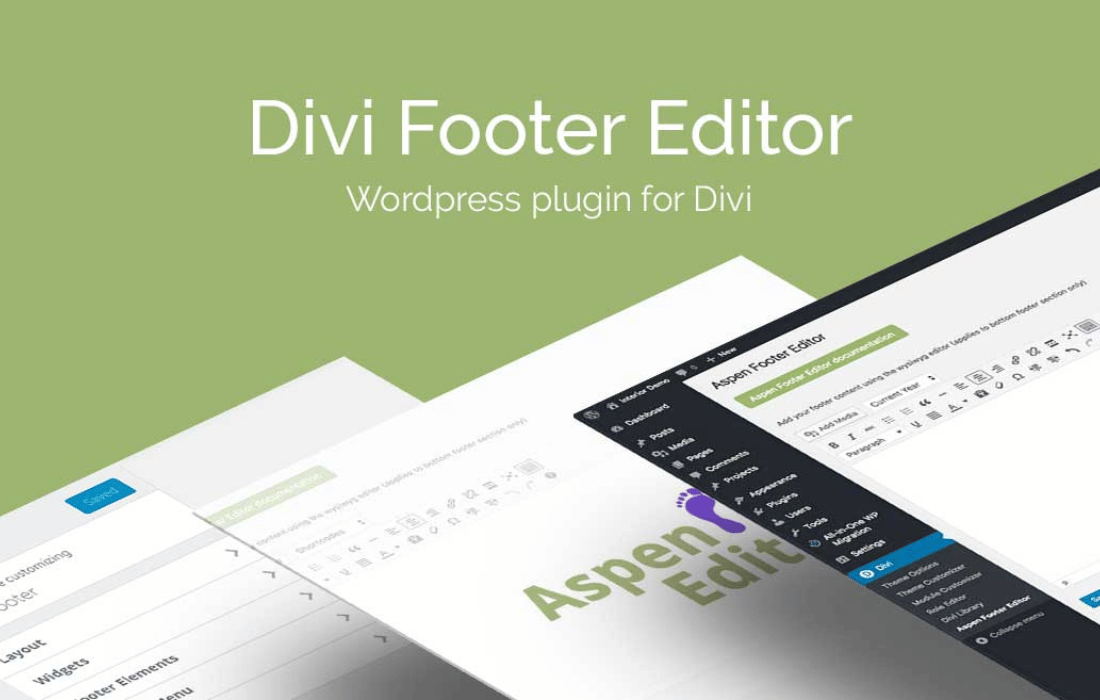
Divi Footer Editor
Divi Footer Editor is a WordPress plugin from Aspen Grove Studios for sites built with the Divi or Extra theme.
Product facts
- Version
- 2.1.7
- Released
- 2 November 2022
- Type
- Plugin
- Licence
- GPL
- Included in
- Every plan, or $3.49 / year on its own
Overview
The footer is often left as an afterthought on Divi and Extra sites. Changing it can mean digging into theme settings or writing code. Divi Footer Editor gives you an editing console that works like the core WordPress editor, so you can type, format and arrange footer content visually. No coding knowledge is needed for the basics.
You build the footer once and it shows on every page of the site, which keeps the bottom section uniform for visitors. Contact details, company credentials, legal notices, images, videos and links all fit in. If you are comfortable with CSS, you can add your own styling to match your brand more closely. The plugin works with both Divi and Extra, so the footer stays consistent with the rest of the design.
Features
- Visual footer editing console: Design and style the footer in an editor that closely resembles the WordPress core page and post editor, so there is little to learn and no code to write.
- Works with Divi and Extra: The plugin is made for both themes, so the footer you build fits the look of the rest of your site.
- One footer across the site: Create a single footer design and it appears on all pages of your Divi or Extra website, giving visitors a uniform experience.
- Custom text and credentials: Add company details, contact information, legal notices or promotional content, with full control over what the footer says.
- Images and videos: Embed images or videos directly in the footer when plain text is not enough to present your brand or message.
- Hyperlink support: Add clickable links to important pages, social media profiles or other resources so visitors can move around the site from the footer.
- Dynamic date shortcodes: Use shortcodes to display the current date in the footer, so date text stays correct without manual edits.
- Advanced CSS styling: Users who know CSS can add custom rules to give the footer a distinct appearance that reflects their brand identity.
Best for
- Divi site owners who want an easier footer editor
- Extra theme users needing one footer across all pages
- Freelancers building branded footers without writing code
Changelog
Version 2.1.7 — 11 March 2020
- Security Fix CSRF vulnerability
FAQ
Is Divi Footer Editor free?
The code of Divi Footer Editor is licensed under the GPL, so anyone may use, change and share it. Buy GPL is a paid service: a plan or a purchase of Divi Footer Editor gives you the download and its updates. The developer's own support, licence key and online services are not included.
Which version of Divi Footer Editor is this?
Version 2.1.7, released 2 November 2022. New versions appear here when the developer publishes them.
How do I update Divi Footer Editor?
Install Buy GPL Updater on your site and paste your key from My Account. It installs new versions of Divi Footer Editor for you.
More from Aspen Grove Studios
Plugin Plugin
 Plugin
 Plugin
 Plugin
 Plugin
 Plugin
 Plugin