
 Plugin
PluginUpdated
Dropzone Field For Elementor Form
Dropzone Field For Elementor Form is a WordPress plugin that adds a drag-and-drop upload area to forms built with Elementor.
Product facts
- Version
- 1.4.0
- Released
- 27 August 2026
- Type
- Plugin
- Licence
- GPL
- Included in
- Every plan, or $3.49 on its own
Overview
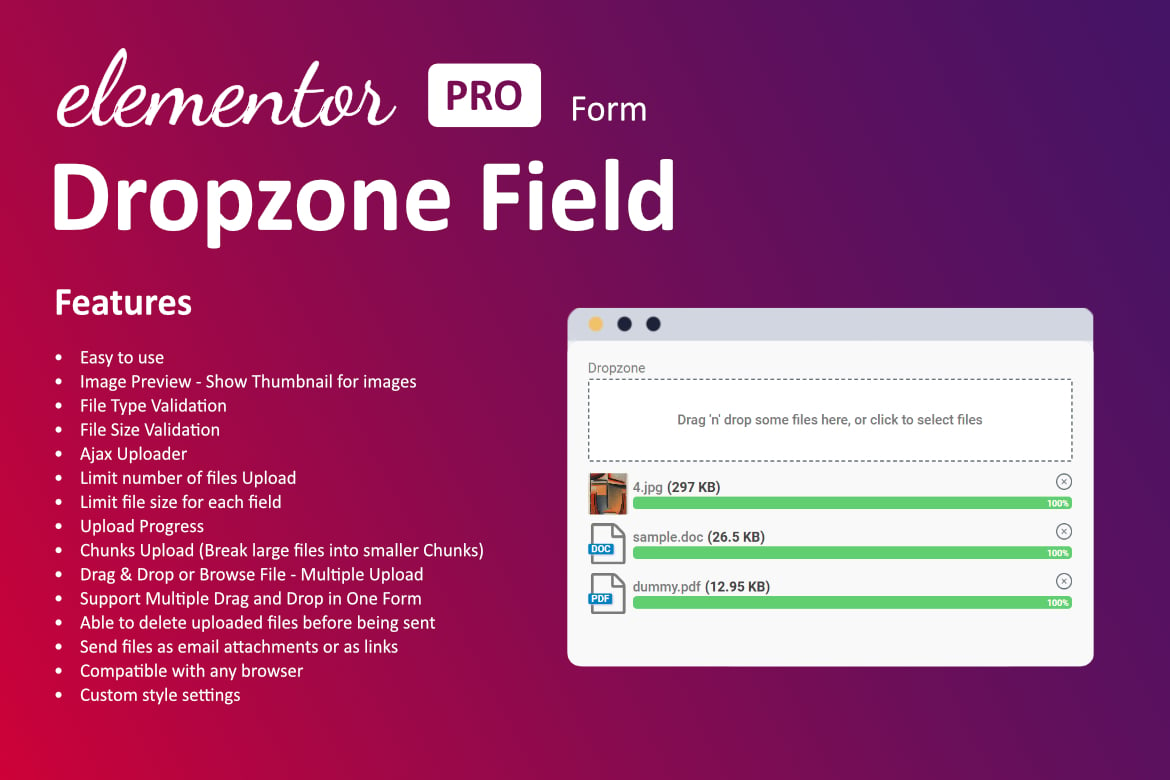
Standard file fields can feel clunky. Visitors have to click, browse folders and wait without knowing what is happening. Dropzone Field For Elementor Form replaces that step with an interactive zone where people drag files straight into the form. It works for images, documents or any other file type you choose to accept.
The field is added inside an Elementor form, so you stay in the builder you already use. You can adjust colors, sizes and messages to match your branding without writing code. Limits on file types and file size keep submissions tidy. It suits contact forms, job applications, feedback forms and any other form that needs attachments.
Features
- Drag-and-drop uploads: Visitors drag files into the form area to attach them, which replaces the usual browse-and-select step with a quicker, more direct way to submit a file.
- Multiple file upload: Users can upload several files at once in a single form submission, which saves them time when they have more than one image or document to send.
- File type and size limits: Restrict which file types are accepted and set a maximum file size, so only valid files make it through your form.
- Upload progress indicator: A real-time visual indicator shows visitors how their upload is going, so they know the file is being sent.
- Customizable design: Change the colors, sizes and messages of the dropzone so the field blends with the style of your website, with no coding knowledge needed.
- Custom success and error messages: Write your own messages for successful uploads and for errors, giving visitors clear instructions or feedback at each step.
- Works inside Elementor forms: The dropzone field is added to any Elementor form, so you build and manage it with the same tools as the rest of your page.
- Responsive on all devices: The field is designed to work on desktops, tablets and smartphones, giving visitors a consistent upload experience on any screen.
Best for
- Elementor users who need file uploads in forms
- Sites collecting job applications or documents
- Agencies building custom contact and feedback forms
FAQ
Is Dropzone Field For Elementor Form free?
The code of Dropzone Field For Elementor Form is licensed under the GPL, so anyone may use, change and share it. Buy GPL is a paid service: a plan or a purchase of Dropzone Field For Elementor Form gives you the download and its updates. The developer's own support, licence key and online services are not included.
Which version of Dropzone Field For Elementor Form is this?
Version 1.4.0, released 27 August 2026. New versions appear here when the developer publishes them.
How do I update Dropzone Field For Elementor Form?
Install Buy GPL Updater on your site and paste your key from My Account. It installs new versions of Dropzone Field For Elementor Form for you.
You might also like
Plugin Plugin
 Plugin
 Plugin
 Plugin
 Plugin
 Plugin
 Plugin