
 Plugin
PluginUpdated
Security Ninja (Premium)
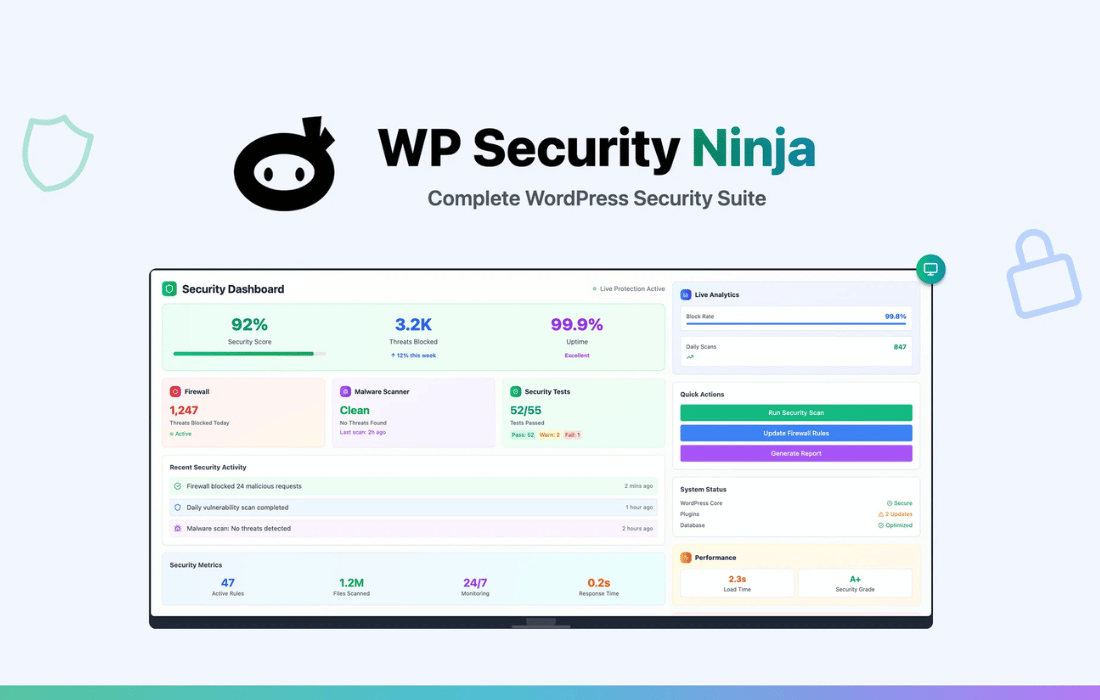
Security Ninja (Premium) is a WordPress security plugin that checks your site for weaknesses and helps you close them.
Product facts
- Version
- 5.308
- Released
- 4 November 2026
- Type
- Plugin
- Licence
- GPL
- Included in
- Every plan, or $3.49 / year on its own
Overview
A WordPress site can have many small weak spots, from login pages open to brute force attempts to core files that change without anyone noticing. Security Ninja (Premium) looks for these problems with over 50 security tests and shows you what needs attention. Malware scanning and core file monitoring check the site itself, while event logging records security-related activity so you can review what happened.
The plugin has an interface made for beginners, and it also has advanced options for developers and security professionals. Scheduled scans run regular assessments without manual work. A Pro upgrade adds a real-time firewall, automated fixes, advanced malware cleanup and white-label options, which suits agencies that manage several client sites and want to present the tool under their own branding.
Features
- Over 50 vulnerability tests: The plugin inspects your site with more than 50 tests to find security loopholes, so you can see which settings and files need to be fixed.
- Malware scanning: A malware scanner checks your site for harmful code. The Pro upgrade adds advanced cleanup to remove what the scan finds.
- Real-time firewall: The Pro upgrade includes a firewall that blocks malicious traffic as it arrives, before it reaches your site.
- Login hardening: Two-factor authentication and IP blocking protect your login against brute force attacks and unauthorized access.
- Core file monitoring: The plugin watches your WordPress core files and flags unauthorized changes, so you can check the integrity of your site's foundation.
- Event logging: Security-related activity is recorded in a log, giving you detail to review when you need to look into suspicious behavior.
- Scheduled scans: Set vulnerability assessments to run on a schedule, so your site is checked regularly without you starting each scan by hand.
- Automated fixes and white label: The Pro upgrade can fix detected issues automatically and lets agencies apply their own branding to the plugin for clients.
Best for
- Site owners who want one plugin for WordPress security
- Agencies managing security across several client sites
- Beginners who want clear tests with room to grow
Changelog
Version 5.308 — 3 November 2026
- Fixed Vulnerability Scanner - The "plugins checked" and "themes checked" numbers now match what is installed. A plugin with many known issues was counted once for each database row, and a theme with no known issues was reported as 0. The scan was already checking the installed list. Run the scan again after updating so the event log shows the new numbers. Thank you Werner.
- Improved Two-Factor Authentication - Login Protection can let a browser skip 2FA for a set number of days after a successful code. It stays off until you set the days (up to 90). The person still ticks "Remember this browser" on the code screen. A password change from the profile screen or the reset email, or resetting 2FA, asks for a code again. Lowering the days cuts short a browser that was remembered for longer. The number is included in Tools import/export. An older export that does not have it leaves the number already on the site. Thank you Torsten.
- Improved Two-Factor Authentication - Backup codes are shown when 2FA setup finishes. The person confirms they have saved them before continuing. Each code is shown once and works once. A password change, or resetting 2FA, deletes the codes. A new set can be created later from the profile.
- Fixed Two-Factor Authentication - The login session created by the password is destroyed before the code screen. The code is checked for the account that passed the password step. A user id sent with the code is ignored. Wrong codes, including backup codes, still count toward lockout, and a blocked IP is not checked for a code.
- Fixed Two-Factor Authentication - "Remember this browser" on the code screen can be ticked. The verify button no longer sits on top of it.
- Fixed Scheduled Scanner - The email names the security test that changed, including the previous result when the message changed. Core files are listed only when they are new or no longer listed. A file that was already reported does not send another change email by itself.
Earlier versions
- 5.307 (1 November 2026): 8 improved, 6 fixed
- 5.306 (21 October 2026): 1 new, 2 improved, 5 fixed
- 5.305 (11 October 2026): 1 new, 15 improved, 4 fixed
FAQ
Is Security Ninja (Premium) free?
The code of Security Ninja (Premium) is licensed under the GPL, so anyone may use, change and share it. Buy GPL is a paid service: a plan or a purchase of Security Ninja (Premium) gives you the download and its updates. The developer's own support, licence key and online services are not included.
Which version of Security Ninja (Premium) is this?
Version 5.308, released 4 November 2026. New versions appear here when the developer publishes them.
How do I update Security Ninja (Premium)?
Install Buy GPL Updater on your site and paste your key from My Account. It installs new versions of Security Ninja (Premium) for you.
You might also like
Plugin Plugin
 Plugin
 Plugin
 Plugin
 Plugin
 Plugin
 Plugin